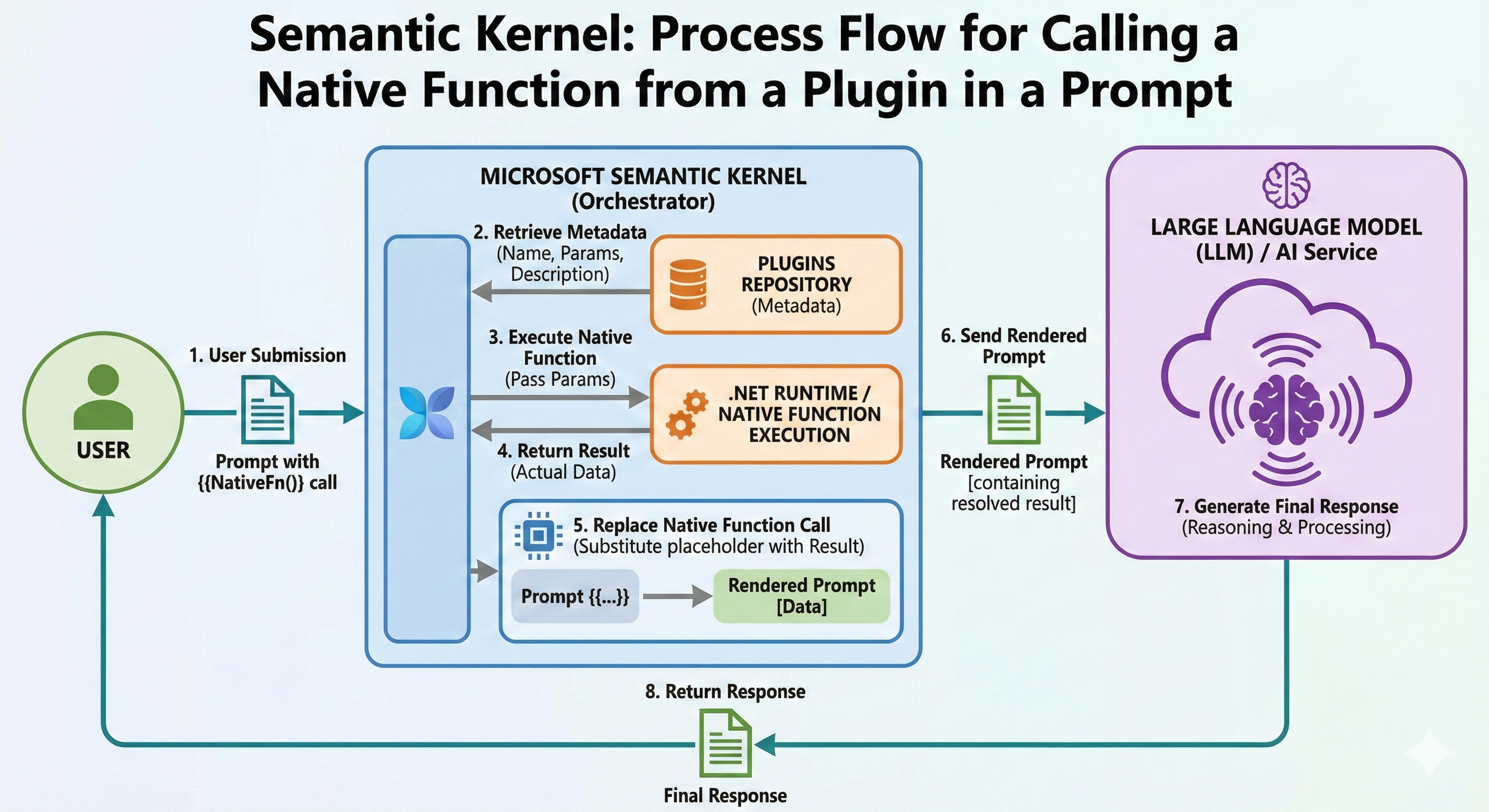
One of the most powerful features of Microsoft Semantic Kernel is its ability to seamlessly integrate native C# functions into AI prompts. This capability enables function calling - where the AI can invoke deterministic code functions to retrieve data, perform calculations, or execute operations during the conversation flow.
This article explores the complete lifecycle of native function invocation from prompts, including:
- How Semantic Kernel discovers and calls native functions
- The 8-step execution flow from prompt to response
- Practical examples using DataAnalyzerPlugin and FileManagerPlugin
- Best practices for designing callable native functions
- Visual infographic of the complete process
What is Function Calling in Prompts?
Function calling (also known as tool use or function invocation) allows the LLM to:
- Recognize when it needs external data or computation
- Request specific function execution
- Receive the result and incorporate it into the response
Simple Example
User: "What's the average of these numbers: 10, 20, 30, 40, 50?"
Without Function Calling: LLM might calculate incorrectly or guess
With Function Calling: LLM calls calculate_average([10, 20, 30, 40, 50]) → Gets precise result: 30 → Responds accurately
📊 THE COMPLETE FUNCTION CALLING FLOW - INFOGRAPHIC
┌────────────────────────────────────────────────────────────────────────────┐
│ CALLING NATIVE FUNCTIONS FROM PROMPTS │
│ 8-Step Execution Flow in Semantic Kernel │
└────────────────────────────────────────────────────────────────────────────┘
┌──────────┐
│ USER │
└─────┬────┘
│
│ ❶ SUBMIT PROMPT
│ "What's the average of 10, 20, 30?"
↓
┌─────────────────────────────────────────────────────────┐
│ SEMANTIC KERNEL (Orchestrator) │
└─────────────────────────────────────────────────────────┘
│
│ ❷ RETRIEVE FUNCTION METADATA
│ Query: Available functions for calculation?
↓
┌─────────────────────────────────────────────────────────┐
│ PLUGINS REGISTRY │
│ ┌──────────────────────────────────────────────┐ │
│ │ Plugin: data_analyzer │ │
│ │ ├─ calculate_average(numbers: double[]) │ │
│ │ │ Description: "Calculates arithmetic mean" │ │
│ │ ├─ find_min_max(numbers: int[]) │ │
│ │ ├─ sort_numbers(numbers: int[], asc: bool) │ │
│ │ └─ calculate_median(numbers: double[]) │ │
│ └──────────────────────────────────────────────┘ │
│ │
│ ┌──────────────────────────────────────────────┐ │
│ │ Plugin: file_manager │ │
│ │ ├─ list_files(extension: string) │ │
│ │ ├─ get_file_info(fileName: string) │ │
│ │ └─ count_files() │ │
│ └──────────────────────────────────────────────┘ │
└─────────────────────┬───────────────────────────────────┘
│
│ Metadata Found:
│ • Function: calculate_average
│ • Parameters: double[] numbers
│ • Description: Available
↓
┌─────────────────────────────────────────────────────────┐
│ SEMANTIC KERNEL (Orchestrator) │
│ │
│ ❸ EXECUTE NATIVE FUNCTION │
│ Invoke: data_analyzer.calculate_average([10, 20, 30]) │
└─────────────────────┬───────────────────────────────────┘
│
│ Function Call Parameters:
│ { numbers: [10, 20, 30] }
↓
┌─────────────────────────────────────────────────────────┐
│ .NET RUNTIME │
│ │
│ public double CalculateAverage(double[] numbers) │
│ { │
│ if (numbers == null || numbers.Length == 0) │
│ return 0; │
│ │
│ return numbers.Average(); // 20.0 │
│ } │
│ │
│ ✓ Executed Successfully │
└─────────────────────┬───────────────────────────────────┘
│
│ ❹ RETURN RESULT
│ Result: 20.0
↓
┌─────────────────────────────────────────────────────────┐
│ SEMANTIC KERNEL (Orchestrator) │
│ │
│ ❺ REPLACE FUNCTION CALL IN PROMPT │
│ │
│ BEFORE: │
│ "What's the average of 10, 20, 30?" │
│ [FUNCTION CALL: calculate_average([10, 20, 30])] │
│ │
│ AFTER: │
│ "What's the average of 10, 20, 30?" │
│ "The function calculate_average returned: 20.0" │
└─────────────────────┬───────────────────────────────────┘
│
│ ❻ SEND RENDERED PROMPT TO LLM
│ Complete context with function result
↓
┌─────────────────────────────────────────────────────────┐
│ LLM (GPT-4o) │
│ │
│ Receives: │
│ • Original User Question │
│ • Function Call Result: 20.0 │
│ │
│ ❼ GENERATE FINAL RESPONSE │
│ │
│ "The average of 10, 20, and 30 is **20.0**. │
│ This was calculated by adding the three numbers │
│ (60) and dividing by the count (3)." │
│ │
└─────────────────────┬───────────────────────────────────┘
│
│ ❽ RETURN RESPONSE TO USER
↓
┌──────────┐
│ USER │ ← "The average of 10, 20, and 30 is 20.0..."
└──────────┘
┌────────────────────────────────────────────────────────────────────────────┐
│ KEY BENEFITS │
├────────────────────────────────────────────────────────────────────────────┤
│ ✓ Deterministic Results │ Native functions provide exact calculations │
│ ✓ Real-Time Data │ Access databases, files, APIs in real-time │
│ ✓ Extended Capabilities │ LLM can perform actions beyond text generation│
│ ✓ Hybrid Intelligence │ Combines AI reasoning with code precision │
└────────────────────────────────────────────────────────────────────────────┘
Step-by-Step Detailed Explanation
Step 1: User Submits Prompt
The user provides a prompt that may implicitly or explicitly require function execution.
Implicit Request (AI Decides)
var userPrompt = "What is the average of these numbers: 10, 20, 30, 40, 50?";
The LLM recognizes it needs to calculate and decides to use the calculate_average function.
Explicit Request (User Specifies)
var userPrompt = """
Please use the calculate_average function to find the mean of:
[15.5, 22.3, 18.7, 25.1, 20.4]
""";
Step 2: Retrieve Function Metadata
When Semantic Kernel receives the prompt, it checks registered plugins for available functions.
How Metadata Retrieval Works
// Plugins are registered
kernel.ImportPluginFromType<DataAnalyzerPlugin>("data_analyzer");
kernel.ImportPluginFromObject(fileManager, "file_manager");
// Kernel inspects available functions:
var availableFunctions = new List<FunctionMetadata>();
foreach (var plugin in kernel.Plugins)
{
foreach (var function in plugin.GetFunctionsMetadata())
{
availableFunctions.Add(function);
}
}
Metadata Sent to LLM
{
"functions": [
{
"name": "data_analyzer-calculate_average",
"description": "Calculates the arithmetic mean of a collection of numbers",
"parameters": {
"type": "object",
"properties": {
"numbers": {
"type": "array",
"items": { "type": "number" },
"description": "Array of numbers to calculate average"
}
},
"required": ["numbers"]
}
},
{
"name": "data_analyzer-find_min_max",
"description": "Finds the minimum and maximum values in a collection",
"parameters": {
"type": "object",
"properties": {
"numbers": {
"type": "array",
"items": { "type": "integer" }
}
}
}
}
]
}
The LLM receives this metadata and can now intelligently decide which function to call.
Step 3: Execute Native Function
The LLM decides which function to call and with what parameters. Semantic Kernel then executes it.
LLM's Function Call Decision
{
"function_call": {
"name": "data_analyzer-calculate_average",
"arguments": {
"numbers": [10, 20, 30]
}
}
}
Kernel Executes the Function
// Semantic Kernel receives function call request
var pluginName = "data_analyzer";
var functionName = "calculate_average";
var arguments = new KernelArguments
{
["numbers"] = new[] { 10.0, 20.0, 30.0 }
};
// Execute
var result = await kernel.InvokeAsync(
pluginName,
functionName,
arguments);
// Behind the scenes: DataAnalyzerPlugin.CalculateAverage() is invoked
public double CalculateAverage(double[] numbers)
{
if (numbers == null || numbers.Length == 0)
return 0;
return numbers.Average(); // Executes: (10 + 20 + 30) / 3 = 20.0
}
Execution Flow Diagram
┌────────────────────────────────────────────┐
│ Semantic Kernel Execution Engine │
├────────────────────────────────────────────┤
│ Step 1: Parse function call request │
│ → Plugin: data_analyzer │
│ → Function: calculate_average │
│ │
│ Step 2: Locate function in registry │
│ → Found: ✓ │
│ │
│ Step 3: Parse and validate parameters │
│ → numbers: [10, 20, 30] │
│ → Type: double[] ✓ │
│ │
│ Step 4: Type conversion (if needed) │
│ → JSON array → .NET double[] │
│ │
│ Step 5: Invoke via reflection/delegate │
│ → Call: CalculateAverage([10,20,30])│
│ │
│ Step 6: Capture return value │
│ → Result: 20.0 │
│ │
│ Step 7: Wrap in FunctionResult │
│ → Success: true │
│ → Value: 20.0 │
└────────────────────────────────────────────┘
Step 4: Return Result
The native function completes and returns the result.
// Function execution complete
var result = 20.0;
// Wrapped in FunctionResult
FunctionResult functionResult = new()
{
PluginName = "data_analyzer",
FunctionName = "calculate_average",
Value = 20.0,
Success = true,
ExecutionTime = TimeSpan.FromMilliseconds(2)
};
Step 5: Replace Function Call in Prompt
Semantic Kernel substitutes the function call placeholder with the actual result.
Before Replacement
System: You have access to these functions:
- data_analyzer.calculate_average(numbers: double[])
User: What's the average of 10, 20, and 30?
[FUNCTION_CALL]
{
"function": "data_analyzer-calculate_average",
"arguments": { "numbers": [10, 20, 30] }
}
[/FUNCTION_CALL]
After Replacement (Rendered Prompt)
System: You have access to these functions:
- data_analyzer.calculate_average(numbers: double[])
User: What's the average of 10, 20, and 30?
[FUNCTION_RESULT]
{
"function": "data_analyzer-calculate_average",
"result": 20.0,
"success": true
}
[/FUNCTION_RESULT]
Now respond to the user's question using the function result.
The placeholder is replaced with the actual execution result, creating a complete context for the LLM.
Step 6: Send Rendered Prompt to LLM
The fully rendered prompt (with function results) is sent to the LLM.
var renderedPrompt = $"""
System: You are a helpful assistant with access to calculation functions.
User: What's the average of 10, 20, and 30?
Function call result: calculate_average([10, 20, 30]) returned 20.0
Please respond to the user incorporating this result.
""";
// Send to LLM
var response = await chatCompletion.GetChatMessageContentAsync(renderedPrompt);
Step 7: Generate Final Response
The LLM processes the complete context and generates a natural language response.
LLM Processing
Input Context:
- User question: "What's the average of 10, 20, and 30?"
- Function result: 20.0
- Task: Provide helpful response
LLM Reasoning:
- The calculate_average function has provided the exact answer
- I should present this result clearly
- I can explain the calculation for educational value
- I'll use natural language to make it conversational
Generated Response:
"The average of 10, 20, and 30 is **20.0**. This was calculated
by adding the three numbers together (10 + 20 + 30 = 60) and
then dividing by the count of numbers (60 ÷ 3 = 20)."
Step 8: Return Response to User
Semantic Kernel returns the LLM's response to the user.
var finalResponse = "The average of 10, 20, and 30 is **20.0**...";
// User receives the complete, accurate response
Console.WriteLine(finalResponse);
Complete Practical Example
Let's see the entire flow in action with real code:
Setup: Register Plugin with Auto Function Calling
using Microsoft.SemanticKernel;
using Microsoft.SemanticKernel.Connectors.OpenAI;
var builder = Kernel.CreateBuilder();
builder.AddOpenAIChatCompletion(
modelId: "gpt-4o",
apiKey: apiKey);
var kernel = builder.Build();
// Register the DataAnalyzerPlugin
kernel.ImportPluginFromType<DataAnalyzerPlugin>("data_analyzer");
// Enable automatic function calling
var executionSettings = new OpenAIPromptExecutionSettings
{
ToolCallBehavior = ToolCallBehavior.AutoInvokeKernelFunctions
};
User Asks Question
var chatHistory = new ChatHistory();
chatHistory.AddSystemMessage(
"You are a helpful assistant with access to mathematical calculation functions.");
chatHistory.AddUserMessage(
"What is the average of these numbers: 15, 25, 35, 45, 55?");
Kernel Orchestrates Function Calling
// Get chat completion with automatic function calling
var response = await chatCompletion.GetChatMessageContentAsync(
chatHistory,
executionSettings,
kernel);
// Behind the scenes:
// 1. LLM receives message and function metadata
// 2. LLM decides to call: data_analyzer.calculate_average([15,25,35,45,55])
// 3. Kernel executes the function → Result: 35.0
// 4. Kernel sends result back to LLM
// 5. LLM generates response with the result
// 6. Response returned to user
Console.WriteLine(response.Content);
// Output: "The average of those numbers is 35.0. I calculated
// this by adding them (175) and dividing by the count (5)."
What Happened Behind the Scenes
📤 USER → KERNEL
"What is the average of 15, 25, 35, 45, 55?"
📋 KERNEL → LLM
User message + Function definitions:
{
"functions": [
{
"name": "data_analyzer-calculate_average",
"parameters": { "numbers": "array" }
}
]
}
🔧 LLM → KERNEL
Function call request:
{
"function": "data_analyzer-calculate_average",
"arguments": { "numbers": [15, 25, 35, 45, 55] }
}
⚙️ KERNEL → PLUGIN
Execute: DataAnalyzerPlugin.CalculateAverage([15,25,35,45,55])
✅ PLUGIN → KERNEL
Result: 35.0
📊 KERNEL → LLM
Function result: 35.0
💬 LLM → KERNEL
"The average of those numbers is 35.0..."
📨 KERNEL → USER
Final response delivered
Real-World Example: File Analysis
Let's use the FileManagerPlugin to demonstrate a more complex scenario.
User Request
var userPrompt = """
I need information about my documents folder.
Can you tell me:
1. How many text files are there?
2. What's the total size of the folder?
""";
Multiple Function Calls
// LLM decides it needs TWO function calls:
// Call 1: Count text files
{
"function": "file_manager-list_files",
"arguments": { "extension": ".txt" }
}
// Result: "file1.txt\nfile2.txt\nfile3.txt" (3 files)
// Call 2: Get directory size
{
"function": "file_manager-get_directory_size",
"arguments": {}
}
// Result: "2.45 MB (2,568,192 bytes)"
// LLM combines both results:
"Your documents folder contains **3 text files** and has a
total size of **2.45 MB** (2,568,192 bytes)."
Code Implementation
// Register FileManagerPlugin
var logger = new Logger("FileOps");
var fileManager = new FileManagerPlugin(logger, @"C:\Documents");
kernel.ImportPluginFromObject(fileManager, "file_manager");
// Enable auto function calling
var settings = new OpenAIPromptExecutionSettings
{
ToolCallBehavior = ToolCallBehavior.AutoInvokeKernelFunctions
};
var chatHistory = new ChatHistory();
chatHistory.AddUserMessage("""
I need information about my documents folder.
Can you tell me:
1. How many text files are there?
2. What's the total size of the folder?
""");
// Kernel automatically:
// 1. Calls list_files(".txt")
// 2. Calls get_directory_size()
// 3. Combines results
// 4. Returns natural response
var response = await chatCompletion.GetChatMessageContentAsync(
chatHistory,
settings,
kernel);
Console.WriteLine(response.Content);
Execution Trace
[2024-01-22 15:30:45] [FileOps] Listing files with extension: .txt
[2024-01-22 15:30:45] [FileOps] Found 3 files
[2024-01-22 15:30:46] [FileOps] Calculating directory size
[2024-01-22 15:30:46] [FileOps] Total size: 2,568,192 bytes
Response: "Your documents folder contains 3 text files and has
a total size of 2.45 MB (2,568,192 bytes)."
Advanced Pattern: Chain Multiple Functions
The LLM can chain multiple function calls to accomplish complex tasks.
User Request
var userPrompt = """
I have this data: [100, 45, 78, 23, 91, 56, 34, 89, 12, 67]
Please:
1. Calculate the average
2. Find the min and max
3. Sort them in descending order
4. Tell me the median
""";
Function Call Sequence
// LLM makes FOUR function calls in sequence:
// Call 1: calculate_average
await kernel.InvokeAsync("data_analyzer", "calculate_average",
new KernelArguments { ["numbers"] = data });
// Result: 59.5
// Call 2: find_min_max
await kernel.InvokeAsync("data_analyzer", "find_min_max",
new KernelArguments { ["numbers"] = data });
// Result: "Min: 12, Max: 100"
// Call 3: sort_numbers (descending)
await kernel.InvokeAsync("data_analyzer", "sort_numbers",
new KernelArguments
{
["numbers"] = data,
["ascending"] = false
});
// Result: "[100, 91, 89, 78, 67, 56, 45, 34, 23, 12]"
// Call 4: calculate_median
await kernel.InvokeAsync("data_analyzer", "calculate_median",
new KernelArguments { ["numbers"] = data });
// Result: 61.5
// LLM combines all results:
"""
Here's the analysis of your data:
1. **Average**: 59.5
2. **Range**: Min is 12, Max is 100
3. **Sorted (Descending)**: [100, 91, 89, 78, 67, 56, 45, 34, 23, 12]
4. **Median**: 61.5
The data shows a fairly wide range with values spanning from 12 to 100,
and a median (61.5) slightly above the mean (59.5).
"""
Enabling Auto Function Calling
Option 1: Automatic (Recommended)
var executionSettings = new OpenAIPromptExecutionSettings
{
// Kernel automatically invokes functions as needed
ToolCallBehavior = ToolCallBehavior.AutoInvokeKernelFunctions
};
var response = await chatCompletion.GetChatMessageContentAsync(
chatHistory,
executionSettings,
kernel);
Pros:
- Fully automatic
- Handles multiple function calls
- Seamless for users
Option 2: Manual (Advanced Control)
var executionSettings = new OpenAIPromptExecutionSettings
{
// LLM requests functions, but YOU invoke them
ToolCallBehavior = ToolCallBehavior.EnableKernelFunctions
};
var response = await chatCompletion.GetChatMessageContentAsync(
chatHistory,
executionSettings,
kernel);
// Check if LLM requested function calls
if (response.Metadata?.ContainsKey("ToolCalls") == true)
{
var toolCalls = response.Metadata["ToolCalls"] as List<ToolCall>;
foreach (var toolCall in toolCalls)
{
// Manually invoke
var result = await kernel.InvokeAsync(
toolCall.PluginName,
toolCall.FunctionName,
toolCall.Arguments);
// Add result to chat history
chatHistory.AddMessage(
AuthorRole.Tool,
result.ToString());
}
// Get final response
var finalResponse = await chatCompletion.GetChatMessageContentAsync(
chatHistory,
executionSettings,
kernel);
}